
The new mDiscipula app
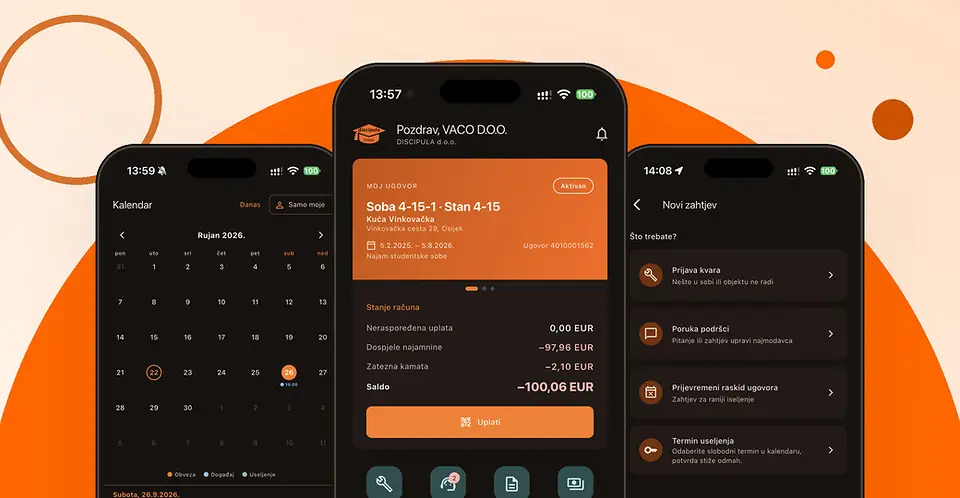
We have launched the mDiscipula app. It brings together your contract, account balance and payments, repair requests and direct communication with us.
From 1 October 2026 we accept repair requests, questions and all other requests only through the app. Requests and questions sent by e-mail or phone after that date cannot be recorded or processed.
This way every request is recorded. You can see who is handling it and how far along it is, and you get a notification as soon as we reply. Nothing gets lost in an inbox, and you do not have to call to check on your request.
Getting started
- Download the app. It is free: search for “mDiscipula” in the App Store (iPhone) or on Google Play (Android).
- Sign in with the e-mail address you gave us. A six-digit code is sent to it, which you enter in the app. No password needed.
- Allow notifications. When the app asks, choose Allow, so you know as soon as we reply to your request.
You only sign in once – the app remembers you for as long as you use it.
What you can do in the app
- Contract and room: your contract with annexes, rental period and documents
- Balance and invoices: what is paid and what is due, the payment plan and issued invoices
- Pay with a barcode: scan it in your banking app, no need to copy the IBAN and reference number
- Repair requests: for your room, a shared area or a specific inventory item, with a photo
- Messages to us: questions and requests, with the whole conversation in one place
- Calendar: duty rota, obligations and events in the building, with automatic reminders
- Downloads: house rules and forms, always in the current version
- Profile: contact details, changing your e-mail address and language (Croatian or English)
How to report a fault or send us a message
In the bar at the bottom of the screen tap Support, then New request, and choose the type: Fault report, Message to support or Early termination of contract. You can also report a fault straight from the home screen with the Report a fault button. Our reply arrives in the same request, and you can keep the conversation going there.
When to contact us outside the app
- You cannot sign in: if the code does not arrive within a few minutes (check your spam folder too), the address you are using is probably not the one in our records. Write to podrska@discipula.hr with your name, surname and room number.
- Emergencies: when people or property are at risk (flooding, fire, a power cut in the whole building), call +385 91 215 3405. If a life is at risk, call 112.
Discipula will never ask you for your sign-in code, by e-mail or by phone. Thank you for moving to the app with us! If you have an idea for improving it, send it to us – through the app, of course.