
Book your move-in slot
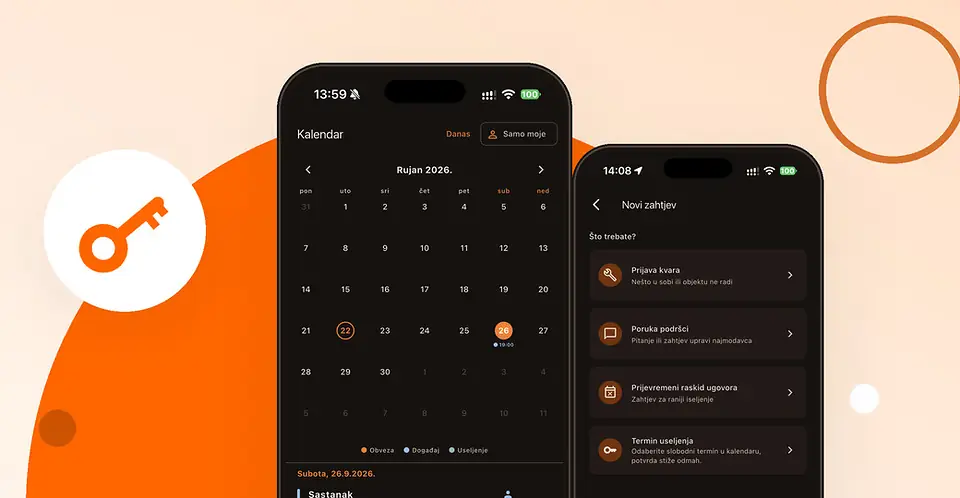
We look forward to welcoming you! You book your move-in slot yourself, in the mDiscipula app. You choose from the free slots, and the booking is confirmed instantly, without waiting for our reply.
Book your slot as soon as possible, while the choice is widest. Move-in slots are arranged only through the app, not by e-mail or phone.
Booking in five steps
- Download the app. It is free: search for “mDiscipula” in the App Store (iPhone) or on Google Play (Android).
- Sign in. Enter the e-mail address you gave us and tap Send code. A six-digit code, valid for 10 minutes, is sent to that address. If it does not arrive, check your spam folder or tap Send a new code after one minute. When the app asks, allow notifications – that is how you receive the booking confirmation and a reminder.
- Open the Calendar. In the bar at the bottom of the screen tap Calendar (the second icon from the left), then the Choose your move-in slot card at the top. You can also open the same list via Support › New request › Move-in slot.
- Choose a day and time. Free slots are grouped by day – tap the time that suits you.
- Confirm. The slot is booked instantly, and you also get a confirmation notification. From then on you see it on the home screen and in the calendar.
Changing or cancelling
On the home screen, tap your Move-in slot. To change it, choose a new time and confirm – the old slot is cancelled automatically. To cancel, tap Cancel slot. You can do both until the slot has passed, and you can only hold one booked slot at a time. If you cannot come, cancel in time so that someone else can take it.
A reminder arrives an hour before the slot, or a day before for an all-day slot.
If something goes wrong
- There is no booking card in the calendar. If you have already booked, you will see your slot on the home screen. If not, there are no free slots at the moment, so check again the next day. If the card is still missing, send us a message in the app: Support › New request › Message to support.
- Someone was faster. If someone takes the same slot at the same moment, the app will tell you and refresh the list. Choose another time.
- The sign-in code does not arrive. If it is not in your spam folder either, the address is probably not the one in our records. Write to podrska@discipula.hr with your name and surname.
On move-in day and after
Come at your booked time on move-in day. You do not need to bring any documents.
After moving in, the app stays with you for everything else: your contract, balance and payments, repair requests and messages to us. We accept all requests and messages only through the app. In an emergency, when people or property are at risk, call +385 91 215 3405, and if a life is at risk, 112.
See you at move-in!